


Texaco
4.7470.00 Reviews
App Specs
- Version
- Varies with Device
- Updated On
- License
- Free
- Downloads
- 100,000+
- Developer
- Chevron U.S.A. Inc.
- Categories
- Maps & Navigation
- Platform
- Android
Screenshots
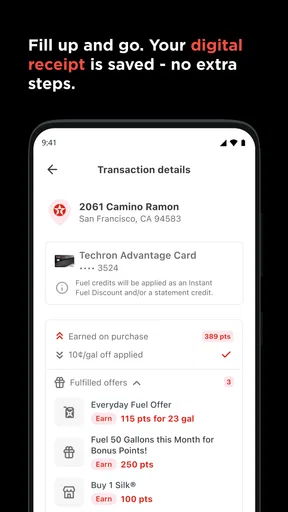

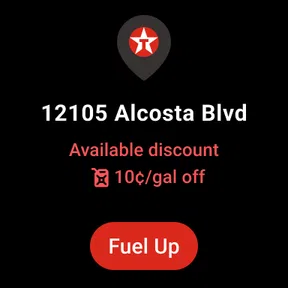
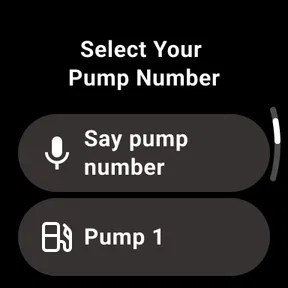
 Analysis by AppCompare
Paying for fuel without leaving the driver’s seat sounds like a small convenience, but it matters most when the weather is unpleasant, a child is asleep in the back, or I am trying to get back on the road quickly. That is the space Texaco occupies. It is a free Maps & Navigation app from Chevron U.S.A. Inc., built around handling fuel payment from the car rather than turning a station visit into a longer stop.
After spending time with it, I see the app as a focused tool rather than a replacement for a full navigation service. Its value depends heavily on where I am, how reliable my connection is, and whether the Texaco station I want to use supports the expected in-app experience. When those pieces line up, the process feels pleasantly direct. When they do not, the app cannot solve the larger problem of finding fuel or completing a transaction in a weak-signal area.
What the app is really useful for
The strongest part of Texaco is its narrow purpose. Instead of asking me to manage a broad collection of travel features, it concentrates on the moment when I have already reached a fuel station and want to pay from inside the vehicle. That makes it easier to understand than an all-purpose travel app, although it also means I should not install it expecting detailed route planning, public transport information, or a complete road-trip dashboard.
The app sits naturally beside ordinary map tools. I might use a familiar navigation app to decide where to stop, then turn to Texaco when I arrive at a participating Texaco location. That division of labor is important: navigation helps me get there, while this app is most relevant at the pump. I would not choose it as my only Maps & Navigation app, but I can see why a regular Texaco customer would keep it ready on a phone.
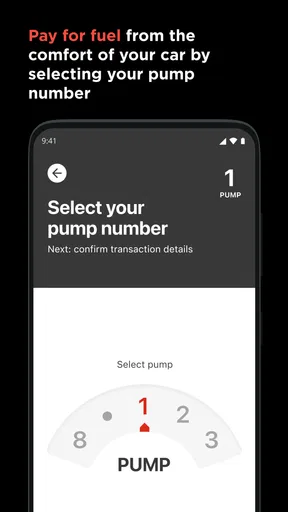
The store summary describes the central idea clearly: fuel payment can be handled from the comfort of the car. In practice, the benefit is not just avoiding a walk to the cashier. It is reducing the number of physical steps in a routine that most drivers repeat often. I can remain in the vehicle, keep my attention on the immediate situation around the pump, and finish without carrying a wallet or phone into the shop simply to pay.
That convenience has a practical boundary. The app does not make fueling instant, and it does not remove the need to position the car correctly, choose the right pump, and follow whatever confirmation the station requires. I still need to pay attention before approving anything. The best experience comes from treating the app as a payment shortcut, not as an automatic process that can be left unattended.
Where connectivity becomes part of the experience
Because the app is used at a physical station but relies on a phone, connectivity becomes part of the workflow. A strong mobile signal can make the interaction feel simple: open the app, identify the relevant station or pump, complete the required steps, and continue with fueling. A weak connection introduces uncertainty at exactly the wrong time, especially if I am parked in an unfamiliar place and want to leave promptly.
Worth Reading Before You Choose

EA SPORTS FC Mobile 26 Is a Bigger Football Game, but It Takes Time

Flipboard Shows What News Apps Must Do Beyond the Feed

Switching to Android Auto Means Rethinking Your Driving Routine

Google Calendar Makes a Crowded Week Easier to Manage

Ludo King Makes the Most of the Minutes Between Plans

Baby Panda World Brings Quick Play to Modern Phones, but Its Game Library Feels Busy
This is one reason I would open the app before pulling into the station when possible. Checking that it launches normally and that my phone is ready gives me a better chance of spotting a problem before I am standing beside the pump. It is a small habit, but it avoids discovering a connectivity issue only after I have already selected a pump and started the payment process.
I also prefer to keep my phone awake and easily accessible while using it, rather than putting it away immediately after arriving. That is not because the app is complicated; it is because payment workflows are more comfortable when I can see each confirmation. If a screen takes longer than expected to load, I know whether the app is still working or whether I need to reconsider my approach.
Connectivity matters differently depending on the setting. In a busy urban area, a short delay may be harmless because there are other ways to pay nearby. On a long rural drive, the same delay can be more frustrating, particularly if the next convenient station is far away. I would not plan a trip around the assumption that mobile service will always be available at every stop.
Using it in ordinary mobile situations
The most convincing everyday scenario is a quick stop during a family journey. I arrive with a passenger who is sleeping, the weather is cold, and I do not want to leave the car unnecessarily. If the Texaco app is already installed and my phone has a reliable connection, paying from the vehicle can turn a mildly awkward stop into a straightforward one. The advantage is especially noticeable when I am traveling alone and would rather keep my belongings and attention inside the car.
It can also suit drivers who make frequent stops at Texaco stations and want a consistent routine. Repetition is where a focused app earns its place: I learn the basic flow once, then use the same approach whenever the situation is familiar. That is more useful to me than a long feature list because the app is solving a recurring inconvenience rather than entertaining me between trips.
At the same time, I would not rely on it casually when my phone battery is nearly empty. A payment method tied to the phone is only convenient while the phone remains usable. I make sure the device has enough charge before a long drive, and I keep another payment option available for situations where the screen, connection, or app session does not cooperate.
Drivers who are uncomfortable with mobile payments may need a short adjustment period. The app’s purpose is easy to grasp, but a new payment habit still requires care. I would take a moment to understand the on-screen instructions while parked, rather than trying to learn the process in a hurry with fuel already needed. Once the routine feels familiar, the interaction becomes less distracting.
What happens when the smooth path breaks
The important question is not whether the app can make a good connection on a normal day. It is what I do when the connection is slow, the app needs another attempt, or I am unsure whether a payment action has completed. In those moments, patience is more valuable than repeatedly tapping the same control. I check for a visible confirmation and avoid starting a second payment until I understand the first result.
This is a general mobile-payment discipline, but it matters particularly at a fuel pump. A delayed screen does not necessarily mean a failed action, and an impatient second attempt could create confusion. I would rather wait briefly, verify the status, and ask station staff for help if the app does not clearly show what happened. The app makes payment more convenient, but it does not remove the need for sensible recovery steps.
A fallback payment method is therefore not an admission that the app is poor. It is part of using any phone-dependent tool responsibly. I keep a physical card or another accepted option available, especially during road trips. That protects me from several unrelated problems at once: low battery, poor signal, a frozen app, or a station-specific issue that prevents the expected flow.
There is also a human recovery path. If I am uncertain about the pump selection or the transaction status, station staff are a better source of immediate clarification than guessing. I would not drive away until I am satisfied that the fueling and payment situation is clear. The app can shorten the process, but the driver remains responsible for checking that the result makes sense.
This is where the app compares differently with paying at the pump using a physical card. A card is often more familiar and may feel more dependable when the phone is struggling. Texaco’s advantage is comfort and reduced handling, not universal resilience. If I value the fewest possible dependencies, the traditional card remains a strong alternative. If I value staying inside the car and already have a reliable phone setup, the app has a meaningful edge.
Being careful with mobile data and attention
Texaco is not the kind of app I would expect to consume attention continuously. I use it at a specific point in a journey, then close it or return to my navigation tool. That limited pattern is useful for data-conscious drivers because I am not keeping a live fuel-payment session open for hours. The more important issue is timing: I avoid opening it repeatedly while driving and handle the interaction only when safely stopped.
For a long trip, I usually prepare before departure. I make sure the app is installed, my account or payment setup is ready if required, and my phone is not overloaded with background tasks. I also avoid relying on a rushed setup at a station. This preparation does not guarantee a perfect connection, but it reduces the amount of work the app must do while I am waiting to fuel.
Using the app selectively also helps me decide whether it is worth keeping. Someone who rarely visits Texaco stations may find a normal card simpler and may not benefit from adding another app to the phone. A driver who regularly chooses Texaco locations has a stronger reason to accept that small amount of digital preparation. The trade-off is not about technology for its own sake; it is about whether repeated convenience offsets the need to maintain a phone-based payment option.
I also appreciate that the app has a clear audience. With an Everyone content rating, it is presented as suitable for a broad range of users, but suitability does not mean every driver will prefer it. Older phones, limited mobile service, or a reluctance to use app-based payment can all make the traditional station experience more comfortable. I would recommend trying it during a low-pressure stop rather than making it essential on the first use.
How it compares with the usual alternatives
Compared with a general navigation app, Texaco is much less ambitious and more situational. A navigation service is better for searching across many fuel brands, comparing routes, and planning a stop before I arrive. Texaco is better when my decision has already narrowed to a Texaco station and I want the payment step to happen from the vehicle. The two types of apps work alongside each other rather than competing directly.
Compared with a station’s physical payment terminal, the app offers comfort but adds a digital dependency. A card at the pump is visible, familiar, and independent of the phone’s battery. The app can be faster in a well-prepared situation, particularly when I want to avoid handling a wallet or walking into the store, but it is less attractive if I do not want to manage another phone-based transaction.
Compared with a broader fuel-rewards or payment ecosystem, the appeal here is focus. I am not choosing it because it promises to organize every part of driving. I am choosing it for a specific Texaco-centered action. That can be a strength for people who dislike cluttered apps, although it may feel limited to drivers who want one application to cover discovery, navigation, payment, records, and trip planning.
The practical decision is simple. If Texaco is a regular part of my routes, I have a dependable connection, and I like paying from the car, the app is easy to justify. If I stop at many different fuel brands, travel through areas with uncertain coverage, or prefer a physical card, I would keep using my usual method and treat this as optional rather than necessary.
Who should install it and who should skip it
I think it is best suited to frequent Texaco customers, solo drivers, families trying to minimize unnecessary stops outside the vehicle, and anyone who values a repeatable fuel-payment routine. It is also a reasonable choice for drivers who already feel comfortable with mobile payments and want a station-specific shortcut instead of a more complicated travel platform.
I would be more cautious recommending it to someone whose phone is old, often uncharged, or regularly outside reliable mobile coverage. The same applies to a driver who rarely visits Texaco locations. In those cases, a physical card and a general map app may cover the actual need with fewer moving parts. Installing an app is not automatically an improvement if the use case appears only once or twice a year.
The public response is encouraging: the app holds a 4.7 average from around 3.9 thousand ratings, with over 100 thousand installs. Those figures suggest that the focused concept works for a substantial group of drivers, while the number of individual written reviews, around 468, gives the overall impression a more limited written sample than the rating alone. I see that as a reason to judge the app against my own travel habits rather than treating popularity as a guarantee.
It has been available since May 15, 2019, which also makes it feel like an established option rather than a brand-new experiment. The developer is Chevron U.S.A. Inc., and the app is free to install. Those details remove two common barriers, but they do not change the central trade-off: the benefit appears at Texaco fuel stops, and the experience is strongest when the phone and connection are ready.
My final view on connected fueling
Texaco is most successful when I treat it as a convenient payment companion, not as a complete navigation solution. Its best moment is very specific: I am at a Texaco station, I have a functioning phone connection, and I want to handle fuel payment without leaving the car. In that situation, the app can make an ordinary stop feel calmer and more efficient.
The connectivity angle keeps the recommendation balanced. A weak signal, low battery, or unclear transaction status can turn the same shortcut into a delay, so I would prepare before a journey and keep a backup payment method nearby. I would also use a separate map service for route planning and station discovery when that is what the trip requires.
After weighing those trade-offs, I would recommend it to regular Texaco users who enjoy mobile payments and want a more comfortable pump experience. I would skip it if my stops are spread across many fuel brands or if I need a payment method that remains dependable without a phone. For the right driver, though, its narrow focus is exactly why it works: it removes friction from one small but repeated part of driving without pretending to replace everything else.
Pros
- Easy access to nearby Texaco stations and fuel prices
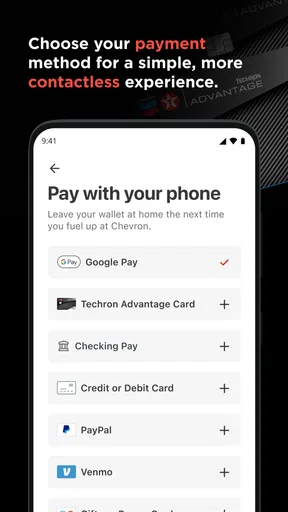
- Convenient in-app payment options at participating locations
- Digital receipts help simplify expense tracking
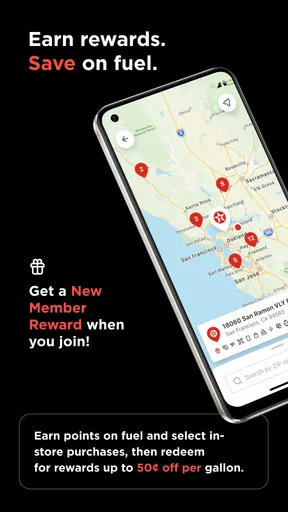
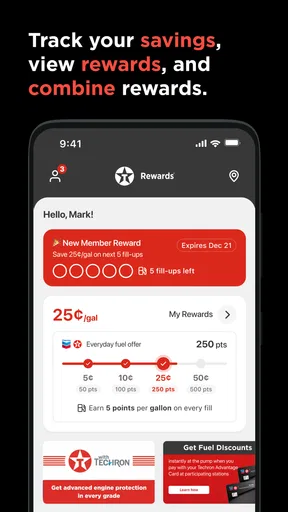
- Rewards features can provide savings on eligible purchases
- Useful for finding fuel
- snacks
- and car services in one place
Cons
- Fuel prices and app features may vary by location
- Some stations may not support every mobile payment feature
- Rewards terms can change and may require account registration
- The app may request location and personal account permissions
- Station information can occasionally be outdated or incomplete
FAQs for Texaco
What is the Texaco app used for?
The Texaco app is designed to make visits to participating Texaco service stations more convenient. Depending on your location, it may help you find nearby stations, check fuel prices, view available services, plan routes, manage loyalty benefits, access promotions, and sometimes pay for fuel or shop purchases. Features can vary by country, so availability should be confirmed in your local app version.
Can I use the Texaco app to find nearby fuel stations and check prices?
Yes, one of the app’s most useful functions is helping drivers locate Texaco stations. After allowing location access, you can generally browse nearby stations, review opening information, identify available services, and, where supported, compare current fuel prices. Price data and station details may not update instantly, so it is sensible to verify important information before making a longer journey.
Does Texaco support mobile payments or fuel payment through the app?
Some Texaco app versions offer mobile payment features, allowing eligible users to pay for fuel without visiting the cashier. The exact process may involve registering a payment card, selecting a pump, confirming the transaction, and following security checks. Mobile payment is not necessarily available at every station or in every country, so check the station’s supported services first.
Does the Texaco app include rewards, discounts, or loyalty benefits?
Texaco may provide loyalty programs, digital rewards, promotional offers, or personalized discounts through its app, depending on the market. Users may need to create an account and scan a digital membership code or apply an offer during checkout. Promotions normally include specific terms, expiration dates, participating stations, and product restrictions, so read the conditions before relying on a discount.
Is the Texaco app free, and what permissions does it require?
The Texaco app is generally free to download, although normal mobile data charges may apply when using maps, station searches, or online account features. It may request permissions such as location, notifications, camera access for scanning codes, and payment-related information. You can review or change permissions in your device settings, but restricting some access may limit particular app functions.


